제품 정보로 건너뛰기
1 26

UUNA TEK

개봉 상품 iDraw H A3 펜 플로터 드로잉 로봇 펜 플로터 드로잉 머신 필기구 서명기 | UUNA TEK

개봉 상품 iDraw H A3 펜 플로터 드로잉 로봇 펜 플로터 드로잉 머신 필기구 서명기 | UUNA TEK

정가 ₩924,000 KRW
정가 ₩1,232,000 KRW 할인가 ₩924,000 KRW
할인 품절
배송료는 결제 시 계산됩니다.
스타일
플러그

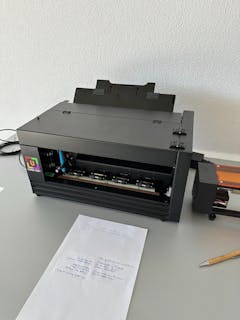
저희는 iDraw H A3 펜 플로터 드로잉 머신의 개봉 상품을 파격적인 가격으로 제공하게 되어 기쁩니다! 이 제품들은 고객님께서 박스를 개봉하신 후 알 수 없는 이유로 아마존을 통해 반품하신 상품입니다. 모든 기능과 액세서리는 완벽하게 갖춰져 있으며, 현지 창고에서 철저한 검사를 마쳤으니 안심하고 구매하세요.

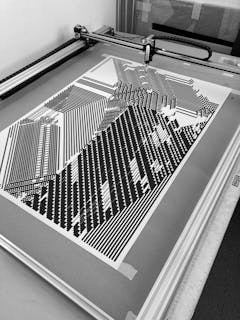
iDraw H A3 펜 플로터 드로잉 로봇, 펜 플로터 드로잉 머신, 필기구 및 서명기로 창의적인 프로젝트를 한 단계 업그레이드하세요. UUNA TEK은 정밀도와 속도 면에서 새로운 기준을 제시하도록 설계되었습니다. 세계에서 가장 빠른 필기구로 알려진 이 제품은 동급 제품 대비 300% 향상된 속도를 자랑하며, 최고의 성능을 추구하는 예술가, 전문가 및 애호가에게 최적의 선택입니다.

전체 세부 정보 보기
  • Effortless Bulk Writing with Email Merge and Hershey Fonts Support

    All UUNA TEK iDraw pen plotter supports Email Merge for bulk writing of letters, envelopes, cards, and invitations. Utilize Hershey Fonts for human-like handwriting.

  • Unmatched Speed - 3X Faster than Others

    UUNA TEK H Version redefines the game with a writing speed of up to 12,000MM/MIN, setting it miles ahead of the competition.

  • Cutting-Edge Technology

    Powered by the Drawcore V2.0 motherboard and equipped with GRBL Compatibility firmware, it represents the pinnacle of innovation.

  • Precision Redefined

    Achieve meticulous mechanical precision with a minimum resolution of 0.01mm for both the Y and X axes, ensuring that your creations are exact to the finest detail.

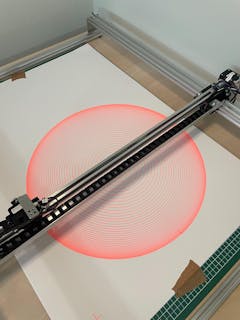
  • Versatile Laser Engraving

    Choose from laser heads from 500mW to 15W power options, allowing you to engrave various materials, from wood and plastics to leather and paper.

  • Intuitive Control

    Seamlessly manage your power rate, engraving speed, and input formats with the UUNA TEK 2.0 Control add-ons.

  • User-Friendly Connectivity

    Connect via USB or Bluetooth, offering flexibility for different operating systems, including Windows 7/8/10/11 or above, Mac OS, and Linux.

축소 가능한 콘텐츠

Specification

  1. Motherboard: Drawcore V2.0
  2. Firmware: GRBL Compatibility
  3. Add-ons: UUNA TEK 2.0 Control
  4. Frame Materials: Aluminum Profile + Steel Plate
  5. Working Area:  420*297mm
  6. Motors: 4* 42 Stepper Motors
  7. Mechanical Precision: Y:0.01 mm,X:0.01mm
  8. Laser Power: 500mW/1600mW/2500mW
  9. Engraving Area:  420*297mm
  10. Wave Length: 445±5nm
  11. Focus: Fixed Focus
  12. Control Mode: PWM
  13. Power Rate: S0-S1,000
  14. Engraving Speed: 0-5,000MM/Min
  15. Writing Speed: 0-12,000MM/MIN
  16. Baud Rate: 115200 - 921600 (Default: 115200)
  17. Input Format: JPG, JPEG, PNG, BMP, SVG, etc.
  18. Input Voltage: 110V-220V (Compatible)
  19. Power Adapter Output: 12V / 1A
  20. Operating Temp.: -20℃-50℃
  21. Product Size: 525*570*160MM
  22. Net Weight: 4-5KG
  23. Limited Switch: Y
  24. Adjustable Angle for Pen: 70-90 Degree
  25. Connectivity: USB, Bluetooth
  26. Support OS and Software: Windows 7/8/10/11 or above(Inkscape), Mac OS (Inkscape for Writing and Drawing, Lightburn for Laser Engraving), Linux

Packing List

1 X UUNA TEK iDraw H A3 Pen Plotter
*1 X A3 Base Plate (Optional)
1 X Tool Kits
1 X Quick Start Guide
1 X Thank You Card

Software

Download the inkscape software and extensive files here>>>.

You can find the software for Windows, Mac, Linux, as well as the assmble guide for hardware and the install details about software.

For those who need advanced functions:

1. For those who need the function to save the plot file, please download this version>>>

2. For those who need email merge function,

Windows: please download this version>>>

Mac or Linux, please download this version>>>

3. For those who need laser function, please download this version>>>

4. What if i have some programing basic and want to adjust the original parameters to break the speed limitation? Plesae download this version>>>

Tutorials

For UUNA TEK 1.0 Pen Plotter, please check the video tutorials here>>>

For UUNA TEK 2.0 Pen Plotter, please check the video tutorials here>>>

For UUNA TEK H Pen Plotter, please check the video tutorials here>>>

For Software, please check the video here>>>

For Laser Function, please check the video tutorials here>>>

Policies

Shipping Policy: All orders will be fulfilled within 48 business hours. All packages will be shipped with DHL/UPS/USPS from our Chinese warehouses or Amazon warehouse, it will take 5-7 business days to your destination. Delay alert during sales seasons. Check the full policy here>>>

Return Policy: We will provide 1-year warranty for all products. Free return and refund will be only provided for any quality issue or damage during delivery. Contact us via support@uunatek.com before return it back. Check the full policy here>>>

iDraw H vs iDraw H SE – Comparison Table
Feature iDraw H iDraw H SE
Motherboard Drawcore V2.0 Drawcore V3.0
Firmware GRBL Compatible GRBL Compatible
Software Support Inkscape Writing, Inkscape Drawing, Lightburn for Laser Full AxiDraw Functions + Python API + CLI
Connectivity USB, Bluetooth USB
Working Area 420 × 297 mm (A3); A2/A1/A0 options available 297 × 210 mm (A4)
Mechanical Precision X/Y: 0.01 mm X/Y: 0.01 mm
Writing Speed Up to 12,000 mm/min Up to 12,000 mm/min
Engraving Speed 0–5,000 mm/min 0–5,000 mm/min
Laser Power Options 0.5W / 1.6W / 2.5W / 10W / 15W N/A
Frame Material Aluminum + Steel Plate Aluminum
Pen Angle Adjustability 70–90° 70–90°
Supported OS Windows, Mac, Linux Windows, Mac, Linux
Input Formats SVG, PNG, JPG, JPEG, BMP SVG, PNG, JPG, JPEG, BMP
Power Adapter Output 12V / 1A 12V / 1A
Operating Temperature -20°C to 50°C -20°C to 50°C

FAQ

Why my Auto Home function is not working well?

Here are some tips for using Auto Home.
1. Check that the contact switch cables are connected correctly, follow this guide:https://www.youtube.com/watch?v=5B4nb2k6eAc2. Manually move the X-axis trolley to the left as far as it will go, and check if it hits the X-axis contact switch.
3. Manually move the Y-axis trolley to the rear as far as it will go, and check if it hits the Y-axis contact switch.
4. Ensure that the cables are properly arranged so that they do not get caught on the XY trolleys, check this guide to organize Z-axis cable:https://www.youtube.com/watch?v=LTwPYPh3rdE

What should I do if I press the red button and the machine stops? Can I resume the plot?

Yes, you can resume your work after pressing the red emergency stop button. Once pressed, the machine will pause and wait for further instructions. To continue:

  1. Open your Inkscape software.
  2. Go to the Extensions menu.
  3. Find the Resume section.
  4. Select Resume (From Home) or Resume (From Where Paused) depending on whether you want to restart from the beginning or continue from the exact stopping point.

👉 Tip: Always make sure to choose the right resume option based on your project progress to avoid overlapping or incomplete drawings.

Why does my iDraw pen plotter throw an error when plotting anything larger than 215 × 300 mm, even though I want to use A3 size?

This usually happens if the wrong model size is selected in your software settings. By default, the software may be set to a smaller model (such as A4), which limits the maximum plotting area.

To fix this, go to:

Option → Config iDraw Model → Choose A3 size

Then try plotting again. Once the correct model size is selected, the machine will support the full A3 plotting area without error.

Can the Z-axis adjust the working distance?

Yes, the Z-axis can adjust the working distance from 0 to 10 mm.

Can pen-down time be controlled?

Yes, pen-down time can be controlled.

Does the machine support G-code commands?

Yes, it supports G-code commands. The motherboard firmware is compatible with GRBL.

Can the Z-axis lift and press smoothly with a payload of around 30–35 g (like a solid steel probe Ø10 mm, length 5 cm)?

Yes, it can. The machine supports loads up to 200 grams and a maximum diameter of 15 mm.

Is the frame stable enough to avoid vibration when pressing?

Yes, the H A3 weighs 7 kg and is sufficiently stable. The operating speed is adjustable.

If it's possible at all to change the setting for how much the pens can be raised/lowered? 

The code limits the height of Z-axis in default, you can adjust the following settings as images to get more flexible.

1.idraw_deps>idraw2_0internal>idraw.py

Adjust the height from 10 to the height you expected like 30 on self.options.pen_pos_up and self.options.pen_pos_down.

Download image 1

2. idraw2_0.inx

Adjust the max="10.0" to the height you like on <param name="pen_pos_down" type="float" min="0.1" max="10.0" _gui-text="Pen height:DOWN, (mm):">5.0</param>

Download image 2